How to Run Lambda on a Schedule
Use Amazon EventBridge Scheduler to invoke a Lambda function on a rate, cron, or one-time schedule. Includes a reusable AWS CDK construct, cron examples, and the legacy EventBridge rules approach.
Update (October 2026): The original post used EventBridge scheduled rules (formerly CloudWatch Events) with CDK v1.
AWS now calls scheduled rules legacy and recommends EventBridge Scheduler, so I rewrote the post around Scheduler and the
stable aws-cdk-lib/aws-scheduler constructs, added a cron cheat sheet, and condensed the rules approach into its own
section.
Running code on a schedule is a very common use case. Traditionally you’d use a cron job for that. But how do you do that in AWS without running a Linux instance just for its crontab?
The Short Answer: EventBridge Scheduler
Use Amazon EventBridge Scheduler. It is a serverless scheduler that invokes a target, e.g. a Lambda function, on a schedule. AWS is explicit about it in the EventBridge docs:
Scheduled rules are a legacy feature of EventBridge. […] We recommend that you use Scheduler to invoke targets on a schedule.
What you get with Scheduler:
- Three schedule types: recurring
rate(...)andcron(...)expressions, and one-timeat(...)schedules. - Time zones: cron and one-time schedules are evaluated in any IANA time zone (e.g.
Europe/Berlin), including daylight saving time adjustments. No more converting everything to UTC. - Flexible time windows: optionally let Scheduler invoke your target anywhere within a window (1 minute to 24 hours) to spread load.
- Retries and dead-letter queues: up to 185 retries and a maximum event age of up to 24 hours. Undeliverable events can go to an SQS dead-letter queue.
- Scale: 10 million schedules per Region by default (adjustable), and 14 million free invocations per month (pricing).
Schedules have a precision of one minute: with flexible time windows turned off, a schedule for 1:00 invokes its target
between 1:00:00 and 1:00:59.
Scheduling a Lambda With EventBridge Scheduler in AWS CDK
The Scheduler constructs started out in the @aws-cdk/aws-scheduler-alpha package. They are stable since aws-cdk-lib
2.186.0 and live in two modules:
aws-cdk-lib/aws-scheduler:Schedule,ScheduleExpression,ScheduleTargetInput,TimeWindow, …aws-cdk-lib/aws-scheduler-targets: the targets, e.g.LambdaInvoke
If you still have @aws-cdk/aws-scheduler-alpha in your package.json, remove it and switch the imports.
The minimal version looks like this:
import { Duration } from 'aws-cdk-lib';import { Schedule, ScheduleExpression } from 'aws-cdk-lib/aws-scheduler';import { LambdaInvoke } from 'aws-cdk-lib/aws-scheduler-targets';
// fn is any lambda.IFunctionnew Schedule(this, 'EveryFiveMinutes', { schedule: ScheduleExpression.rate(Duration.minutes(5)), target: new LambdaInvoke(fn),});LambdaInvoke creates the execution role that Scheduler assumes and grants it lambda:InvokeFunction on your function.
You don’t have to write any IAM yourself.
A Reusable ScheduledLambda Construct
In the original version of this post, I built a reusable construct that bundles the Lambda, its log group, and the schedule. That idea still holds. Here is the updated version using Scheduler, including a dead-letter queue and retries.
Initialize the project in a directory called scheduled-lambda (cdk init names the generated files and stack after
the directory) and create the file for the construct:
mkdir scheduled-lambda && cd scheduled-lambdanpx aws-cdk@latest init app --language typescripttouch lib/scheduled-lambda.tsnpm i -D esbuild💡 I don’t install the CLI globally.
npx aws-cdk@latestruns the latest CLI forinit, which addsaws-cdkas a dev dependency. After that,npx cdkuses the version pinned in the project.
💡 I use
NodejsFunctionbecause it bundles TypeScript with esbuild. I installesbuildas a dev dependency. Without it, CDK bundles inside a Docker container, which takes more time and space.
import { Duration, RemovalPolicy } from 'aws-cdk-lib';import * as lambda from 'aws-cdk-lib/aws-lambda';import { NodejsFunction, NodejsFunctionProps } from 'aws-cdk-lib/aws-lambda-nodejs';import * as logs from 'aws-cdk-lib/aws-logs';import { ContextAttribute, Schedule, ScheduleExpression, ScheduleTargetInput, TimeWindow,} from 'aws-cdk-lib/aws-scheduler';import { LambdaInvoke } from 'aws-cdk-lib/aws-scheduler-targets';import * as sqs from 'aws-cdk-lib/aws-sqs';import { Construct } from 'constructs';
interface ScheduledLambdaProps { lambdaProps: NodejsFunctionProps; schedule: ScheduleExpression; timeWindow?: TimeWindow;}
export class ScheduledLambda extends Construct { readonly lambda: NodejsFunction; readonly deadLetterQueue: sqs.Queue; readonly schedule: Schedule;
constructor(scope: Construct, id: string, props: ScheduledLambdaProps) { super(scope, id);
this.lambda = new NodejsFunction(this, 'Lambda', { runtime: lambda.Runtime.NODEJS_24_X, memorySize: 128, logGroup: new logs.LogGroup(this, 'LogGroup', { retention: logs.RetentionDays.ONE_WEEK, removalPolicy: RemovalPolicy.DESTROY, }), ...props.lambdaProps, });
this.deadLetterQueue = new sqs.Queue(this, 'DeadLetterQueue', { retentionPeriod: Duration.days(14), });
this.schedule = new Schedule(this, 'Schedule', { schedule: props.schedule, timeWindow: props.timeWindow, // defaults to TimeWindow.off() target: new LambdaInvoke(this.lambda, { input: ScheduleTargetInput.fromObject({ scheduledTime: ContextAttribute.scheduledTime, }), retryAttempts: 3, maxEventAge: Duration.hours(1), deadLetterQueue: this.deadLetterQueue, }), }); }}A few notes:
- Log group: By default, Lambda creates a log group that never expires and survives
cdk destroy. Passing my ownlogGroupgives me control over retention and removal. - Input:
ContextAttribute.scheduledTimeresolves to<aws.scheduler.scheduled-time>, which Scheduler replaces with the scheduled invocation time. That is handy for idempotency and for knowing which run you are processing, especially with retries or flexible time windows. - Retries and DLQ: Scheduler invokes Lambda
asynchronously, so there are two
layers. If Scheduler’s call to Lambda fails, it retries retryable errors up to 3 times within 1 hour. Events it can’t
deliver end up in the dead-letter queue.
LambdaInvokealso grants the execution rolesqs:SendMessageon the queue. Once Lambda has accepted the event, errors thrown by your handler are Lambda’s business: it retries twice by default and then discards the event. Those failures never reach the Scheduler DLQ. To tune or capture them, passretryAttempts,maxEventAge, or anonFailuredestination vialambdaProps.
💡 I prefer to set things like
runtimeandmemorySizeexplicitly to make them obvious and keep them stable in case a default changes in the future. Anything inlambdaPropsoverrides them.
Using the Construct
The Lambda handler is plain TypeScript. It receives the input defined above:
type ScheduledEvent = { scheduledTime: string;};
export const handler = async (event: ScheduledEvent) => { console.log(`Running job scheduled for ${event.scheduledTime}`); // do the actual work here};This stack runs it every weekday at 08:00 in Berlin, regardless of daylight saving time:
import * as path from 'path';import { Stack, StackProps, TimeZone } from 'aws-cdk-lib';import { ScheduleExpression } from 'aws-cdk-lib/aws-scheduler';import { Construct } from 'constructs';import { ScheduledLambda } from './scheduled-lambda';
export class ScheduledLambdaStack extends Stack { constructor(scope: Construct, id: string, props?: StackProps) { super(scope, id, props);
new ScheduledLambda(this, 'WeekdayReport', { lambdaProps: { entry: path.join(__dirname, '..', 'lambdas', 'report', 'index.ts'), }, schedule: ScheduleExpression.cron({ minute: '0', hour: '8', weekDay: 'MON-FRI', timeZone: TimeZone.EUROPE_BERLIN, }), }); }}CDK turns this into cron(0 8 ? * MON-FRI *) with the schedule time zone Europe/Berlin. cdk init already created
bin/scheduled-lambda.ts, which instantiates the stack:
import { App } from 'aws-cdk-lib';import { ScheduledLambdaStack } from '../lib/scheduled-lambda-stack';
const app = new App();new ScheduledLambdaStack(app, 'ScheduledLambdaStack');Deploy it:
npx cdk deployYou’ll find the logs in CloudWatch under the function’s log group and the schedule in the EventBridge console under Scheduler > Schedules.
⚠️ Run
npx cdk destroyafterwards if you only tried this out. Otherwise, the Lambda keeps running every weekday.
Rate, Cron, and One-Time Schedules in CDK
ScheduleExpression has a factory for each schedule type:
import { Duration, TimeZone } from 'aws-cdk-lib';import { ScheduleExpression } from 'aws-cdk-lib/aws-scheduler';
// every 15 minutesScheduleExpression.rate(Duration.minutes(15));
// 02:30 on the first day of every month, New York timeScheduleExpression.cron({ minute: '30', hour: '2', day: '1', timeZone: TimeZone.AMERICA_NEW_YORK });
// once, on 24 December 2026 at 18:00 Berlin timeScheduleExpression.at(new Date('2026-12-24T18:00:00Z'), TimeZone.EUROPE_BERLIN);
// any raw expressionScheduleExpression.expression('cron(0 18 ? * 6L *)', TimeZone.EUROPE_BERLIN);Two gotchas:
at()and time zones: CDK takes the UTC representation of theDate(toISOString()) as the wall-clock time and passes the time zone separately. Sonew Date('2026-12-24T18:00:00Z')withTimeZone.EUROPE_BERLINmeans 18:00 in Berlin, not 18:00 UTC. Write the time you want with aZsuffix and pick the time zone via the second argument.- One-time schedules stay around: A completed one-time schedule still counts against your schedule quota. AWS
recommends deleting them, e.g. via
ActionAfterCompletion: DELETEin the API/CLI.
Recurring schedules also accept start and end dates if a job should only run within a certain period.
Without CDK: Console or AWS CLI
In the console, go to Amazon EventBridge > Scheduler > Schedules > Create schedule, pick a one-time or recurring schedule, choose AWS Lambda Invoke as the target, and let the console create the execution role for you.
With the AWS CLI, you need an existing execution role that allows lambda:InvokeFunction and trusts
scheduler.amazonaws.com
(setup guide):
aws scheduler create-schedule \ --name weekday-report \ --schedule-expression "cron(0 8 ? * MON-FRI *)" \ --schedule-expression-timezone "Europe/Berlin" \ --flexible-time-window '{"Mode": "OFF"}' \ --target '{ "Arn": "arn:aws:lambda:eu-central-1:123456789012:function:report", "RoleArn": "arn:aws:iam::123456789012:role/scheduler-invoke-report", "Input": "{\"scheduledTime\": \"<aws.scheduler.scheduled-time>\"}", "RetryPolicy": {"MaximumRetryAttempts": 3, "MaximumEventAgeInSeconds": 3600} }'For a one-time schedule, use --schedule-expression "at(2026-12-24T18:00:00)" and add
--action-after-completion DELETE so it cleans up after itself.
Cron and Rate Expressions
Rate Expressions
rate(value unit) with a positive number and minutes, hours, or days, e.g. rate(5 minutes). Without a start
date, a rate schedule starts right after you create it. A rate(1 days) schedule always runs 24 hours after the last
invocation, even on days that are 23 or 25 hours long due to daylight saving time.
Cron Expressions
AWS cron expressions are not the 5-field crontab format you might know from Linux. They have six required fields:
cron(minutes hours day-of-month month day-of-week year)| Field | Values | Wildcards |
|---|---|---|
| Minutes | 0-59 | , - * / |
| Hours | 0-23 | , - * / |
| Day-of-month | 1-31 | , - * ? / L W |
| Month | 1-12 or JAN-DEC | , - * / |
| Day-of-week | 1-7 or SUN-SAT | , - * ? L # |
| Year | 1970-2199 | , - * / |
The rules that usually trip people up:
- The
?rule: You can’t use*in both day-of-month and day-of-week. If you specify one of them, the other one has to be?. - Day-of-week starts on Sunday:
1isSUN,7isSAT. I’d use the names to avoid off-by-one surprises. L,W, and#:Lmeans last (day of month or week),15Wis the weekday closest to the 15th, and2#1is the first Monday of the month.- Time zone: In EventBridge Scheduler, cron and
at()expressions are evaluated in the schedule’s time zone (UTC if you don’t set one). EventBridge scheduled rules always use UTC. - DST: If a run falls into the skipped hour when clocks spring forward, Scheduler skips it for that day. When clocks fall back, it runs only once.
Some practical examples:
| Expression | Runs |
|---|---|
cron(0 8 ? * MON-FRI *) | Every weekday at 08:00 |
cron(0/15 * * * ? *) | Every 15 minutes (at :00, :15, :30, :45) |
cron(0 0 1 * ? *) | At midnight on the first day of every month |
cron(0 18 ? * 6L *) | At 18:00 on the last Friday of every month |
cron(30 9 ? * 2#1 *) | At 09:30 on the first Monday of every month |
All times are in the schedule’s time zone.
Alternative: EventBridge Rules (Legacy Scheduled Rules)
Before Scheduler launched in November 2022, the way to go was an EventBridge rule with a schedule. EventBridge rules were formerly known as CloudWatch Events, which is why you’ll still see that name in older posts. This is what the original version of this post built:
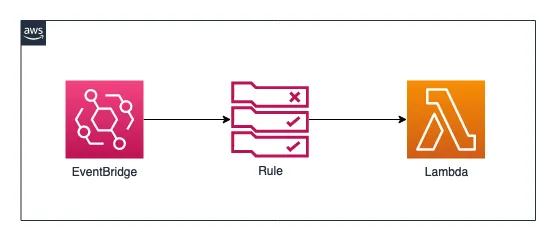
Scheduled rules still work, but only on the default event bus. In CDK v2, it looks like this:
import { Duration } from 'aws-cdk-lib';import * as events from 'aws-cdk-lib/aws-events';import * as targets from 'aws-cdk-lib/aws-events-targets';
// fn is any lambda.IFunctionnew events.Rule(this, 'EveryFiveMinutesRule', { schedule: events.Schedule.rate(Duration.minutes(5)), // or: events.Schedule.cron({ minute: '0', hour: '6', weekDay: 'MON-FRI' }), always UTC targets: [new targets.LambdaFunction(fn, { retryAttempts: 3 })],});Instead of an execution role, LambdaFunction adds a resource-based policy to the function that allows
events.amazonaws.com to invoke it. You can find the original CDK v1 example
on GitHub.
EventBridge Scheduler vs. Scheduled Rules
| EventBridge Scheduler | Scheduled rules (legacy) | |
|---|---|---|
| Schedule types | rate, cron, one-time (at) | rate, cron |
| Time zone | Any IANA time zone, DST-aware | UTC only |
| Scale (default) | 10,000,000 schedules per Region, adjustable | 300 rules per bus, shared (100 in some Regions), adjustable |
| Targets | One target per schedule; 270+ services via universal targets | Up to 5 targets per rule |
| Permissions | Execution role per schedule | Resource-based policy (Lambda) or role, per target |
| Flexible time window | Yes | No |
| Retries and DLQ | Yes | Yes |
For new code, I’d always pick Scheduler. The only reason I’d still reach for a rule is an existing setup that works, or when I really want one schedule to fan out to several targets. Even then, a schedule that puts an event onto an event bus is usually the cleaner option.
Conclusion
Running a Lambda on a schedule is a few lines of CDK: a Schedule, a ScheduleExpression, and a LambdaInvoke target.
With EventBridge Scheduler you get time zones, one-time schedules, retries, and a dead-letter queue on top, without
having to think in UTC.
I personally use exactly this pattern to buy some crypto every week. The use cases for executing code on a schedule are almost endless.