AWS Beginner: AWS is different. What are AWS Accounts, IAM Users and Root User?
The AWS account setup is different from other services. There are accounts, IAM users and a root user. But what are the differences?
Update (October 2026): I added a side-by-side comparison of the root user and IAM users, and a section on IAM users vs. IAM roles. I also updated the root user guidance to AWS’s current recommendations and separated account name and account alias.
Things are confusing when you are just starting to use AWS. You don’t just create an account and get started as you do with other services. You come across terms like “Account”, “User” and “Root User” and maybe ask yourself how they differ. This post should help understand these terms.
When You Sign Up for an AWS Account
If you sign up for an AWS account you will be asked to enter a “Root user email address” and an “AWS account name”:
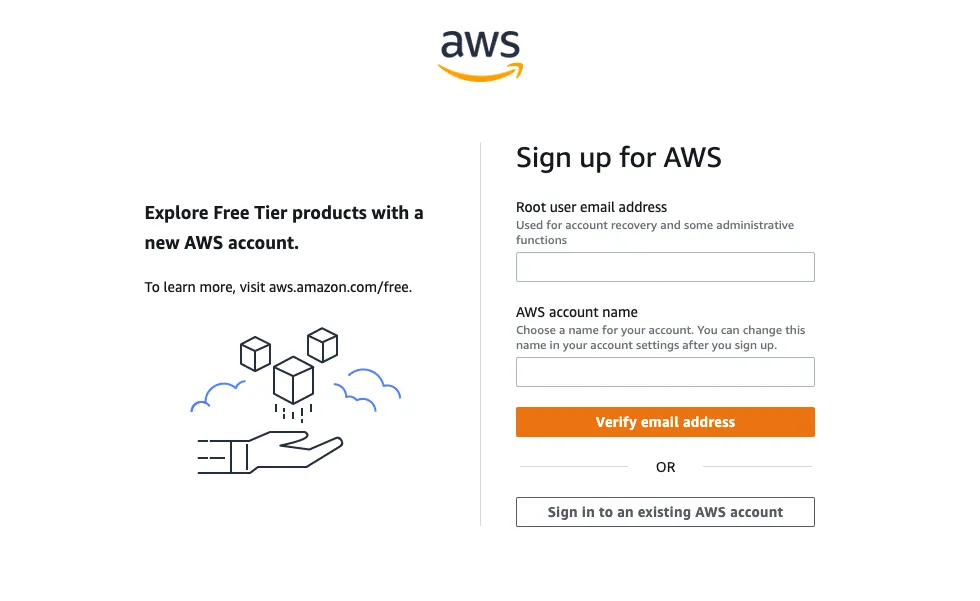
After you finish the signup process, you will end up with an account (identified by a 12-digit account ID and the account name you entered) and some credentials (email and password of your root user) to enter that account.
This is what the AWS docs say about the root user:
We strongly recommend that you don’t use the root user for your everyday tasks and that you follow the root user best practices for your AWS account. Safeguard your root user credentials and use them to perform the tasks that only the root user can perform.
For everyday work, AWS recommends an administrative user in IAM Identity Center (more on that below). Many people still start with an IAM user (often just referred to as user; this is how you can create an IAM user). But what is the difference between an IAM user and the root user? And usually, if you sign up for a service you create an account with credentials and end up with one thing: an account. Why do you have (at least) three account-related things in AWS? How are they different? Before we will get to the definitions we will have a look at how to sign in using either the root user or an IAM user.
Sign In to your account
This is what the sign-in screen looks like when you click on the “Sign In” button on https://aws.amazon.com/console/:
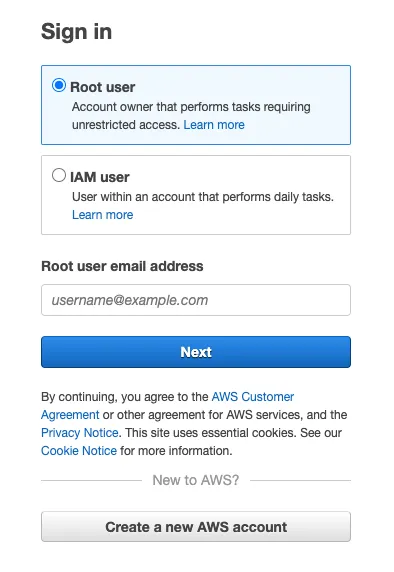
You can either go ahead and sign in as a root user by just providing the root user email address and the password or you can sign in as an IAM user by providing the account ID or account alias first and the IAM user name and password in the second step:
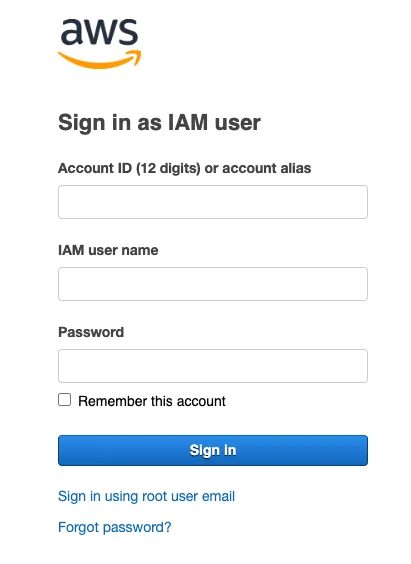
Note how you don’t have to provide the account ID for the root user as that user has to be unique globally.
Also, you can use a sign-in URL like https://123456789012.signin.aws.amazon.com/console with your account ID to
skip typing it. If you want something easier to remember, create an
account alias in IAM and use
https://myaccountalias.signin.aws.amazon.com/console instead. The alias is not the same as the account name you entered
during signup: it is a separate, optional setting, must be unique, and is not a secret.
Definitions
Now let’s get to the definitions.
Account
Think of an account as just a container. A container containing your resources, users and account settings.
You can create multiple of these containers. In fact, it is best practice to separate your different workloads (for example test and production) into different accounts.
Root User
The root user is the master of your account. It is the central key (this is why you should activate Multi-Factor Authentication (MFA) for it) and provides unrestricted access to the account. There is always exactly one root user per account.
There are some tasks that only a root user can do, e.g. changing the root user’s email address or password, closing a standalone account, or restoring permissions if the only IAM administrator locked themselves out. Other settings, like the account name or contact information, don’t require the root user.
Again: use MFA for your root user and only use that user if you have to, don’t use it for everyday work.
IAM User
An IAM User is an entity representing a person or an application (it is not necessarily a person, this can be confusing because the word “user” implies a person). You create the IAM users after the initial creation of your root user. An account can have several users (think of people or applications being able to access the container of resources).
There are various ways how you can grant IAM users permissions in order to be able to do something. One of them is
attaching policies to the IAM user (learn more about IAM policies). An IAM user with
the AdministratorAccess policy attached is not the same as the root user.
Root User vs. IAM User: Key Differences
| Root user | IAM user | |
|---|---|---|
| How many per account | Exactly one | Up to 5,000 |
| Created | Automatically when you sign up | By you, in IAM |
| Sign in with | Email address and password | Account ID or alias, user name, and password |
| Permissions | Full access, can’t be limited by identity-based policies | None by default, granted via policies |
| Root-only tasks (e.g. closing a standalone account) | Yes | No, not even with AdministratorAccess |
| Use it for | The few root-only tasks | Day-to-day work (or better: see roles below) |
You can’t attach identity-based policies to the root user. In an AWS Organization, service control policies (SCPs) can restrict what the root user of a member account can do. Resource-based policies can restrict it, too: an S3 bucket policy that denies all principals also locks out the root user (which can then only delete that policy).
IAM User vs. IAM Role
There is a third identity type you will run into quickly: the IAM role. Like an IAM user, a role has permissions granted via policies. The difference is how you get its credentials:
- IAM user: Has long-term credentials, a password for the console and/or access keys for the CLI and SDKs. They stay valid until you rotate or delete them.
- IAM role: Has no long-term credentials. Someone or something assumes the role and receives temporary credentials that expire automatically.
Roles are what you use for:
- AWS services: A Lambda function or an EC2 instance gets its permissions via a role (e.g. the Lambda execution role), never via access keys.
- Access across accounts: A user or role in account A assumes a role in account B. I wrote about that in AWS cross-account access.
- People: AWS recommends that humans sign in via federation, e.g. with IAM Identity Center, and work with temporary credentials instead of long-lived IAM users (IAM best practices).
Rule of thumb: if you are about to create access keys for an IAM user, check whether a role does the job. Temporary credentials expire on their own if they leak.
Conclusion
The concept of accounts and users in AWS is different from what we are used to (Google, Spotify, etc.). This can lead to confusion. Hopefully this post has cleared up that confusion for you.
If you need help getting going, feel free to ask questions.