It is quite common to need a secret value of some kind in a Lambda function. Either for a database connection, a 3-rd party service, or whatever else. But how to securely use secrets in your Lambda?
In this post, I am going to tell you why environment variables are not the tool for the job and what the preferred way looks like.
I will also provide you with an example implementation showing you how to do better using AWS CDK and TypeScript.
Why Environment Variables Are Not the Best Solution for Accessing Secrets
I am sure I don’t have to tell you why it is a bad idea to put secrets in plain text into your code base. But why aren’t environment variables very secure either? AWS suggests not using environment variables for your secrets:
To increase database security, we recommend that you use AWS Secrets Manager instead of environment variables to store database credentials.
(from Securing environment variables)
This tweet from Yan Cui (@theburningmonk) sums up the reasons pretty well:
Depends on if you put them as plaintext in env vars - if a function is compromised then env vars is the 1st place attackers would look. There have been multiple instances of compromised NPM packages that steal env vars when initialized. This affects lambda too.
— Yan Cui (@theburningmonk) June 2, 2021
There are malicious packages out there sending your environment variables somewhere else. Just google something like “npm package malicious environment variables” and you will find lists of malicious packages. Often they create packages with almost identical names than widely used packages. If you do a typo while installing a package you could end up sending your secrets to a bad actor. This is not an issue that is specific to AWS Lambda – but the solution I am going to show you is.
In addition to that, secrets stored in environment variables will be visible to everyone having access to that Lambda in the AWS console. With other services (I will get to them in the next section) you can restrict who is able to see the secrets.
How to Securely Access Secrets in AWS Lambda?
Now that we know why using environment variables for secrets is a bad idea, how can we do better?
Retrieving Secrets at Runtime
One solution has already been mentioned in the quote in the previous chapter:
AWS Secrets Manager. Another popular solution is
AWS Systems Manager Parameter Store.
Both of them allow you to securely store secrets and retrieve them using the aws-sdk. They provide a different set of
features but this is out of scope for this article – both of them are doing the job for the use case I will be showing
you. There are other solutions out there as well, but AWS Secrets Manager and AWS Systems Manager Parameter Store (SSM
Parameter Store) are the most common ones. I will go ahead and use SSM Parameter Store for further examples.
Malicious packages could theoretically still get access to your secrets somehow but there is now more to it than just
sending process.env somewhere. So this is not an 100% protection, but it is safer and as part of
Defense in Depth a good practice.
It would be even safer to place the Lambda in a VPC and prevent it from connecting to the internet altogether. But that comes with other downsides and isn’t always applicable.
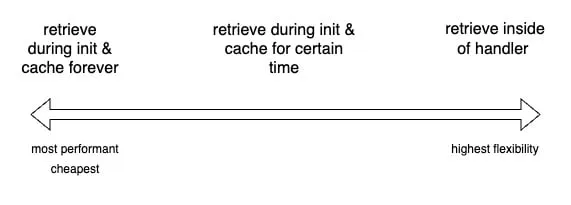
Back to SSM: You have different options on how to retrieve and use secrets from SSM – as always, all of them have different trade-offs:
- Retrieve secrets inside of the Lambda handler
- Retrieve secrets during Lambda init phase (outside of handler) & cache them forever (= for the time of the Lambda execution context)
- Retrieve secrets during Lambda init phase & cache them for a certain period, e.g. 5min
The trade-off you have to make is between performance & price (less API calls are cheaper and faster) and flexibility (you can change secrets immediately if you don’t cache them).
Retrieving Secrets in AWS Lambda using AWS CDK
Now that we know the theory, let’s go ahead and implement it. I will be using AWS CDK and TypeScript for this.
Before we go ahead with writing actual code, let’s create a secret we want to retrieve. We can create it via the AWS
console or via the awscli like this:
aws ssm put-parameter --name "/dev/service-a/secret-key" --type "SecureString" --value "my-super-secret-secret"
Note: I like to use a naming convention like /[stage]/[service]/[parameter] in order to keep everything nice and
organized and to be able to easily construct and access parameters for different environments.
You can find the code in my JannikWempe/lambda-retrieve-secrets repository.
This is how you get access to that previously created secret in CDK:
export class LambdaRetrieveSecretsStack extends Stack { constructor(scope: Construct, id: string, props?: StackProps) { super(scope, id, props);
const serviceASecretKeyParameter = StringParameter.fromSecureStringParameterAttributes( this, 'ServiceASecretKey', { parameterName: '/dev/service-a/secret-key' }, // replace with your parameter name ); }}Now we can reference that secret and use CDKs utilities in order to grant access to that secret. Let us add a Lambda
function, pass the parameterName to it as an environment variable, and grant access to read that secret:
export class LambdaRetrieveSecretsStack extends Stack { constructor(scope: Construct, id: string, props?: StackProps) { super(scope, id, props);
const serviceASecretKeyParameter = StringParameter.fromSecureStringParameterAttributes( this, 'ServiceASecretKey', { parameterName: '/dev/service-a/secret-key' }, // replace with your parameter name );
const secretsExampleLambda = new NodejsFunction(this, 'SecretsExampleLambda', { entry: path.join(__dirname, 'lambda', 'index.ts'), runtime: Runtime.NODEJS_16_X, environment: { SERVICE_A_SECRET_KEY_PARAMETER_NAME: serviceASecretKeyParameter.parameterName, }, });
serviceASecretKeyParameter.grantRead(secretsExampleLambda); }}That is it from the CDK side. Now let us create the handler and retrieve that secret. I like to use middy which describes itself as “stylish Node.js middleware engine for AWS Lambda”. It offers some helpful middlewares like ssm which will help us retrieve and cache values from SSM Parameter Store. (Middy provides various other official middlewares including one for Secrets Manager.) I prefer a middleware for this because it keeps the code for retrieving the secret out of your handler which should deal with actual business logic.
The handler could look like this:
import middy from '@middy/core';import ssm from '@middy/ssm';
const { SERVICE_A_SECRET_KEY_PARAMETER_NAME } = process.env;
if (!SERVICE_A_SECRET_KEY_PARAMETER_NAME) { throw new Error('SERVICE_A_SECRET_KEY_PARAMETER_NAME environment variable is not set');}
export const handler = middy((_, context) => { // ⚠️⚠️⚠️ you should never log secrets; just for demo purposes ⚠️⚠️⚠️ console.log(context.SERVICE_A_SECRET_KEY);}).use( ssm({ fetchData: { SERVICE_A_SECRET_KEY: SERVICE_A_SECRET_KEY_PARAMETER_NAME, }, cacheKey: SERVICE_A_SECRET_KEY_PARAMETER_NAME, cacheExpiry: 60 * 5, // 5min setToContext: true, }),);We are wrapping the handler with middy in order to be able to use the ssm middleware which will retrieve the
decrypted secret for us.
fetchData lets us define the name we want to use for the retrieved parameter as a key and the parameterName as the
value.
Make sure to set setToContext: true. That way the secret is accessible via the Lambda context. It will not end up in
the environment variables.
Also, I am setting a cacheExpiry of 5min here. That way the Lambda will retrieve the secret in the init phase and will
reuse that value for 5min in subsequent requests in that execution environment. If the execution environment is still
running after 5min, the secret will again be fetched during the next invocation. This is somewhere in the middle of the
trade-off spectrum between cost & performance and flexibility.
Conclusion
There are safer ways to use secrets in your AWS Lambda than by using environment variables. It is not much harder to use AWS services like Secrets Manager or SSM to retrieve secrets at runtime. In fact, it will become easier to manage the secrets from a central place. You can easily rotate secrets in a central place and configure permissions only showing the secrets to authorized people. From now on, you should not use environment variables for secrets.